Introduction Git & GitHub

What is Git? 🐱
Git is a super cool distributed version control system 🔄 created by Linus Torvalds in 2005. 🚀 It helps developers track changes in their code and collaborate seamlessly with team members. 🤝 Git stores your project's history, allowing you to travel back in time ⏪ and undo mistakes or explore different ideas. Plus, it works offline, so you can code even without internet access! 🌐
What is GitHub? 🐙
GitHub, on the other hand, is a web-based hosting service for Git repositories. 🌐 Think of it as the social network 📱 for developers, where they can store their Git repositories remotely and easily share their code with the world. GitHub provides a user-friendly interface 🎨 for collaborating, managing issues, and hosting documentation. It's like a treasure trove of open-source projects and a hub for software development! 🏰
The Difference Between Git & GitHub 🔄🌐
While Git and GitHub work together like two peas in a pod, it's essential to understand their differences:
🐱 Git is the version control system itself, the software installed on your computer that manages your project's history.
🐙 GitHub is a web-based platform where you can host your Git repositories and collaborate with others.
In short, Git is the brain 🧠, and GitHub is the heart ❤️ of modern software development!
Version Control System: Tracking Changes Made Easy! 🔄
Imagine you're working on a team project, and everyone is editing the same files simultaneously. 😱 Chaos, right? Here's where version control comes to the rescue!
Version control is a system that keeps track of changes made to your code over time. 🕰️ It allows you to:
Revert to a previous version if something goes wrong.
Collaborate with others seamlessly without conflicts.
Organize your work and manage project history efficiently.
Types of Version Control Systems 🌱
There are two main types of version control systems:
Centralized Version Control System (CVCS): In this system, all team members connect to a central server to get the latest code and submit changes. It's like a hub where everyone syncs their work.
Distributed Version Control System (DVCS): Unlike CVCS, DVCS allows every team member to have their copy of the entire project repository. This setup enables greater flexibility and collaboration, even without an internet connection.
Basic Git Commands Cheat Sheet 📝
👉 git init: Initialize a new Git repository.
👉 git add : Add changes to the staging area before committing.
👉 git commit -m "your message": Save changes to the repository with a descriptive message.
👉 git status: Check the status of your working directory and staged files.
👉 git log: View the commit history.
👉 git pull: Fetch and merge changes from a remote repository to your local one.
👉 git push: Send your committed changes to a remote repository.
👉 git branch: List, create, or delete branches.
👉 git merge : Merge changes from another branch into the current one.
Git Architecture
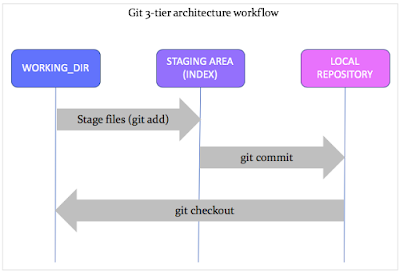
Now you have the basics to embark on your version control journey with Git and GitHub! 🚀


